
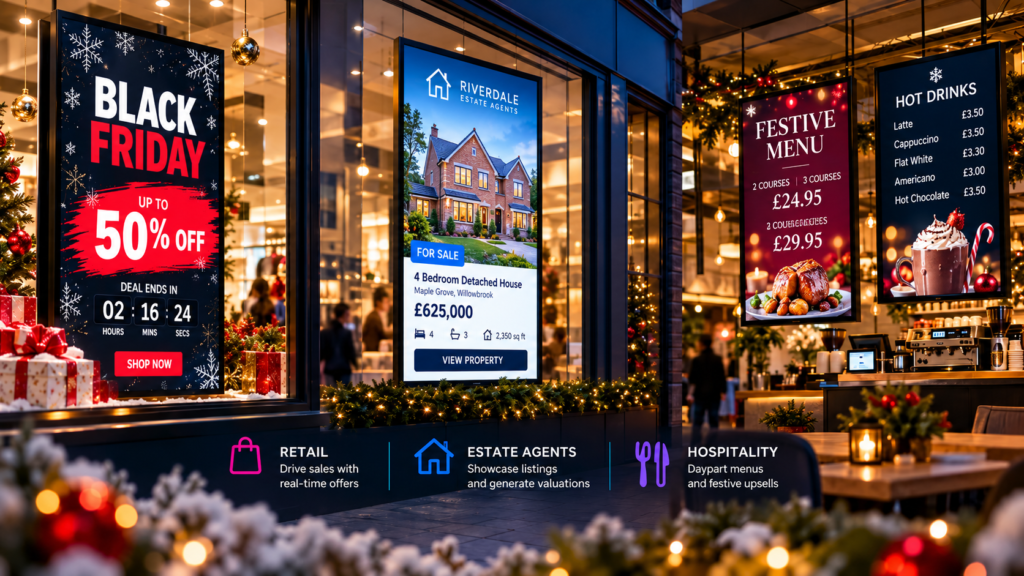
Peak season moves fast. Offers change by the hour, stock shifts, and customers want clear answers now. With dynamic digital signage and cloud content management, you can update your advertising displays within seconds, switch prices across sites instantly, and keep windows bright and clear from Black Friday through New Year.
This playbook gives you practical ideas for retail, hospitality, and estate agents. You will find moving adverts, flash deal timers, voucher QR codes, daypart menus, and last-posting-date notices, plus templates and a 6-week schedule you can roll out today.
If you already have screens, use this as your content plan. If you are starting from scratch, it shows exactly what to display, when to display it, and how to keep everything on brand.
Why dynamic screens win peak season
- Speed: launch flash deals and pause them in minutes.
- Consistency: switch prices and creative across one site or many at once.
- Clarity: bright windows and clean layouts cut through low winter sun and evening footfall.
- Relevance: daypart menus and timed notices stay helpful throughout the day.
If you want a quick overview of what digital signage can do, explore how Visivo approaches digital signage and visual marketing.
Retail: Black Friday to last-minute gifting
Aim for short loops with bold prices, stock flags, and motion that catches the eye without clutter.
Ideas you can deploy today:
- Flash deal timers and price reveals that change by the hour.
- Voucher QR codes for gift cards and click-and-collect.
- Animated gift-by-budget panels and curated bundles.
- Last posting dates, local delivery cut-offs, and extended hours.
- Gentle festive overlays, then a clean New Year clearance set.
Template suggestions:
- Bold price slash and countdown layout.
- Stock running low tag for fast movers.
- Gift guide grid with three price bands and a clear call to buy now.
For sector-specific inspiration, see our guidance on retail displays and digital display retail.
Hospitality: daypart menus and festive upsells
Keep service smooth and upsells visible. Use digital menu boards to switch content automatically from breakfast to lunch to evening.
High-impact moves:
- Breakfast-lunch-evening daypart menus that change on schedule.
- Timed promos for early-bird sets or happy hour.
- Allergen notes and QR links to full ingredients.
- Gift voucher QR codes for last-minute gifts at the till.
- New Year specials and Dry January options ready to roll on 1 January.
Template suggestions:
- Three-panel digital menu with a rotating upsell tile.
- Festive set menu card with a simple price lock.
- Countdown graphic for limited-time sides.
If you run cafés or fast casual venues, explore ideas for digital menu boards and digital displays for restaurants.
Estate agents: windows that work all day
Your window needs to present listings clearly and signal action points in seconds.
Quick wins:
- Portfolio-style layouts with recent instructions and reductions.
- Animated price-change highlights that pause for readability.
- Valuation prompts and QR codes for instant booking.
- Timed shifts from daytime listings to evening hero panels.
- New Year toolkit with fresh valuation messages from Boxing Day.
Template suggestions:
- Dual-screen setup: listings on the left, hero property plus valuation callout on the right.
- Price-change ribbon with gentle motion that draws the eye.
- Local brand messages placed in a consistent corner across slides.
See more on digital signage for estate agents and estate agents window displays.
Your 6-week peak schedule
Use this week-by-week plan as a base. Adjust timings for your footfall.
Week 1: Black Friday build-up
- Tease doorbusters, load countdowns, prep stock notices.
- Retail: hourly flash deal placeholders.
- Hospitality: weekend set-menu preview.
- Estate agents: just-listed reel and valuation nudge.
Week 2: Black Friday week
- Activate flash deal timers, pause or extend in seconds.
- Retail: bundle grids and low-stock flags.
- Hospitality: queue screen with quick upsells.
- Estate agents: reductions panel and after-hours hero slides.
Week 3: Early December focus
- Launch gift guides and voucher QR codes.
- Retail: gift-by-budget panels and staff picks.
- Hospitality: festive sets, allergen QR, group booking prompt.
- Estate agents: featured homes plus seasonal greeting.
Week 4: Posting deadlines and store hours
- Last posting dates, click-and-collect cut-offs, extended hours.
- Retail: same-day pick-up banner; easy-return notice.
- Hospitality: brunch to evening daypart schedule; voucher push.
- Estate agents: appointment prompts for quiet days.
Week 5: Final pre-Christmas push
- Final stock notices and timed offers.
- Retail: last-chance gifts and order cut-offs.
- Hospitality: walk-in availability, set menu highlights, gift voucher QR at the till.
- Estate agents: Boxing Day listings teaser and valuation CTA loaded in advance.
Week 6: Boxing Day to New Year
- Switch to sale, returns info, and New Year messaging.
- Retail: sale grids and restock notices.
- Hospitality: New Year’s Eve menu and Dry January trail.
- Estate agents: New Year toolkit with animated price-change highlights and appraisal prompts.
Practical content tips that keep windows bright and clear
- Use big type, high contrast, and short lines for pavement readability.
- Keep glass clean and test your view from outside.
- Our screens automatically adjust brightness to stay clear in daylight and after dark.
- Use short-burst motion and keep key calls to action in the same screen position.
If you need hardware, browse our range of advertising monitors and other digital signage products to match your space and window.
Starting from zero: fast setup steps
- Pick one high-impact location where most people look.
- Choose three messages: primary offer, secondary upsell, clear call to action.
- Add one QR code for vouchers or bookings.
- Schedule daypart changes so content feels fresh without manual edits.
- Save a short festive loop and a New Year loop so you can switch instantly.
With cloud content management you can roll these changes out in seconds across one site or many.
FAQ: quick answers
- How do I start digital content creation? Begin with one screen, three core messages, and a simple template. Add a QR code for a single action, then schedule by time of day. Keep loops short and readable from the pavement.
- What are the 5 C’s of content creation? Clarity, Consistency, Contrast, Call to action, and Cadence. Say it simply, keep it on brand, make it easy to see, tell people what to do, and time it right.
- Do digital content creators make money? Yes, many do through campaign creation, template packs, retainer updates, and seasonal rollouts. Earnings vary by scope, sector, and volume of work.
- What are the types of digital signage? Window digital signage, in-store promotional screens, digital menu boards, interactive kiosks, portable digital displays, LED video walls, and multi-screen systems with sound.
Ready-to-use templates
Ask for festive countdowns, flash deal cards, daypart menu boards, valuation prompts, and voucher QR overlays. We can tailor layouts for retail, hospitality, and estate agency use so you are live within days, not weeks.